Skip to the content

In invite-only pilots

Describe the change. Get the draft in your own template.

An engineer describes a change, or gives TechniFile the documents, and gets back a finished draft in the company's own template, ready to review, complete and sign. Every value comes from your documents; anything that does not is flagged, never guessed.

TechniFile drafts and checks. Your engineers review, complete and sign.

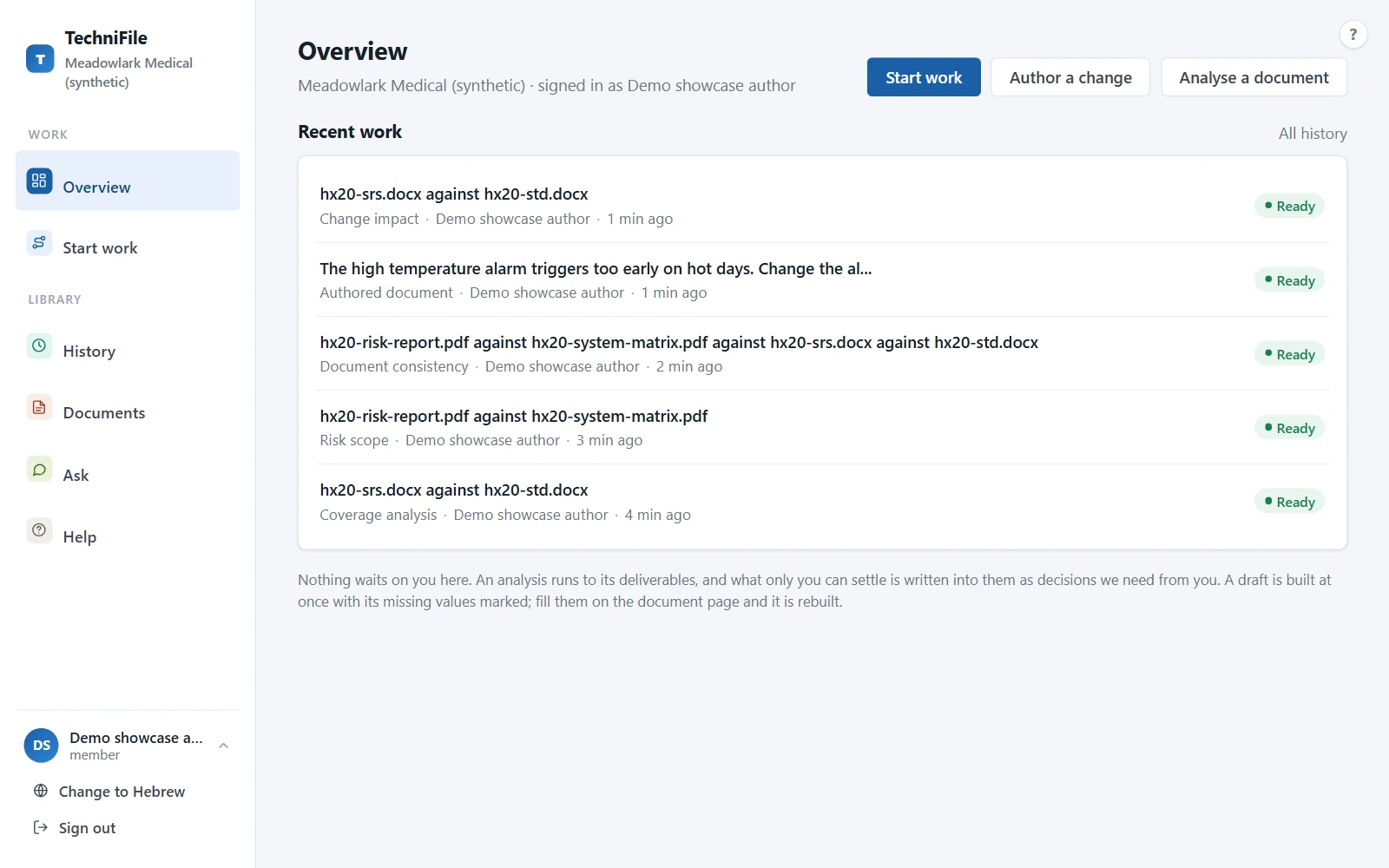
The TechniFile Overview: the latest drafts and analyses of an invented device, each with its state, who started it and when

What TechniFile delivers

Seven deliverables on one engine. Each comes out as a Word or Excel file in your template, labelled proposed until a qualified person at your company approves it.

Author

Drafts in your template, from a description or from your requirements.

  • Authoring draft

    Describe a change in your own words, in Hebrew or English, typos and all. The change document comes back in your template, every value quoted from your references or marked for the engineer to supply.

  • Test description

    Test cases written from your requirements into your template, with the means taken from your own existing tests, and a traceability workbook beside the document.
Analyse

Checks whose every figure is computed and reconciled.

  • Coverage gap analysis

    Are your requirements covered by your tests? Each requirement is read against the tests that cite it and classed as covered, partial or missing, in a report and a traceability matrix whose counts reconcile.

  • Consistency check

    Do your documents agree with each other? Identifiers, sections, references and revisions are checked between the requirements and the test description and inside each, every conflict placed where it sits.

  • Risk scope

    Which risks do the gaps touch? Your risk report and system traceability matrix, read the way your team declares them, checked through to the requirements and the tests.

Maintain

What a change does, and what it takes to close the gaps.

  • Change impact

    A new revision of your requirements: what changed, what it reaches in the tests and how the coverage moves, judged again and reported.

  • Coverage completion

    The changes your test description needs to close its gaps: citations to add or correct, steps to fix and new test cases, each with its effect on the figures, for your engineers to accept or reject.

In every deliverable

  • Your templates and your words

    Your company's templates, and its own words for a requirement, a test and its documents, set up with you during the pilot.

  • Hebrew or English

    Ask in Hebrew or English. The portal speaks both, and every document stays in the language it was written in.

  • Every gap flagged, never guessed

    A value TechniFile cannot source from your documents is a marked gap for the engineer to fill, never a guess.

  • Your layer, exportable

    Your templates, references, terminology and instructions export as one bundle whenever you ask, to use with an AI of your own. No lock-in.

How it works

Four steps. The engineer is the author at every one of them.

  1. Upload or point to your documents

    Requirements, test descriptions, risk files, templates and references, in Word, Excel or PDF. Every revision is kept, and each piece of work records the exact revision it read.

  2. Choose a deliverable

    Pick one, or say what you need in plain words. TechniFile proposes a plan and asks only what it cannot settle on its own.

  3. Review, complete and sign

    Every value shows where it came from, and every gap is marked for the engineer to fill. Nothing is approved inside TechniFile.

  4. Hand it to your QMS or PDM

    Download the Word and Excel files and file them in your own document control. TechniFile is not a QMS and keeps no controlled records.

A look inside

Real screens from the TechniFile portal, on an invented company and device. No client's data appears on this page.

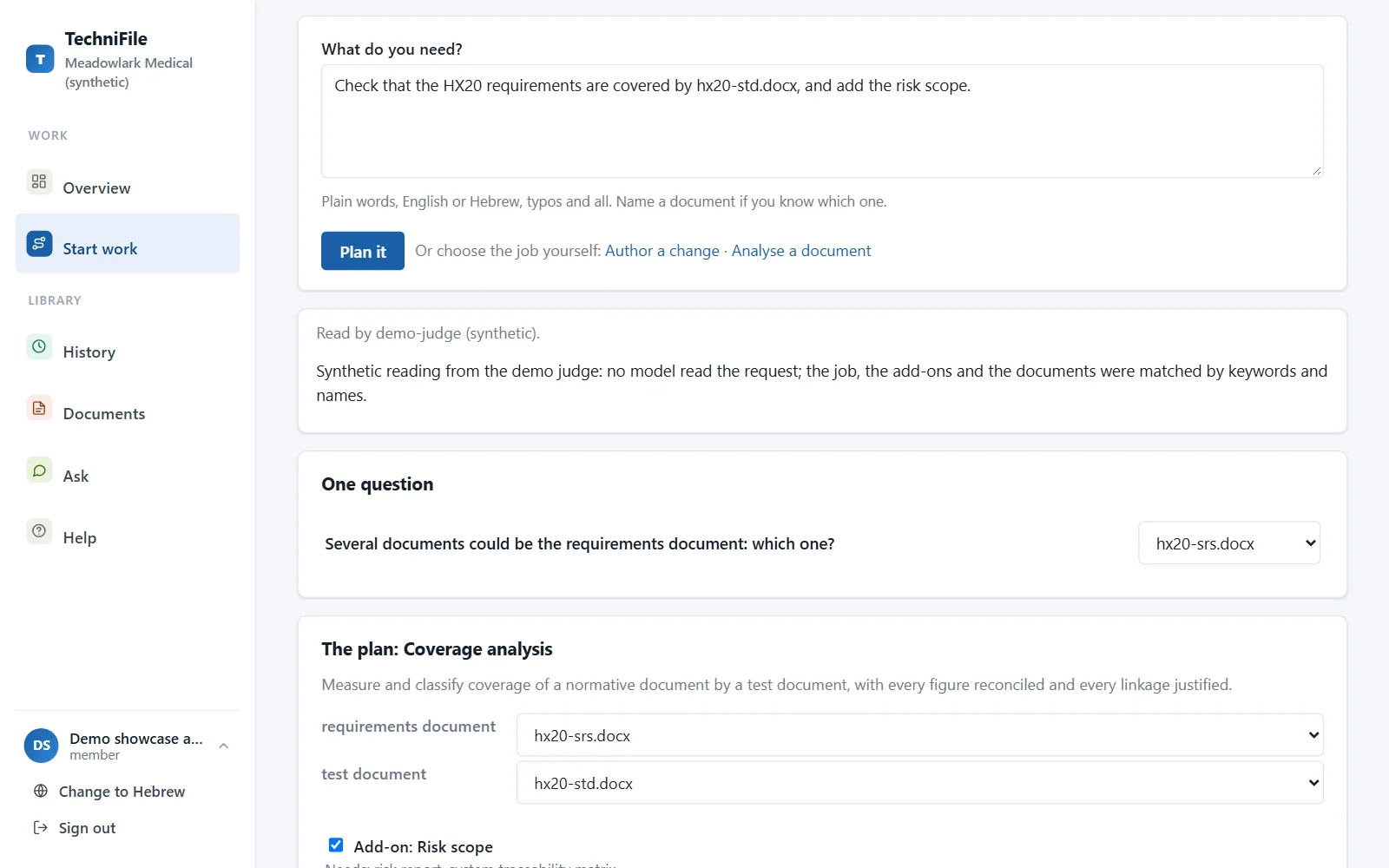
Start work in plain words

Say what you need. TechniFile reads the request against your documents, proposes the job and the documents it would use, and asks only what is unclear.

The Start work page: a request in plain words and the plan TechniFile proposes, with one question

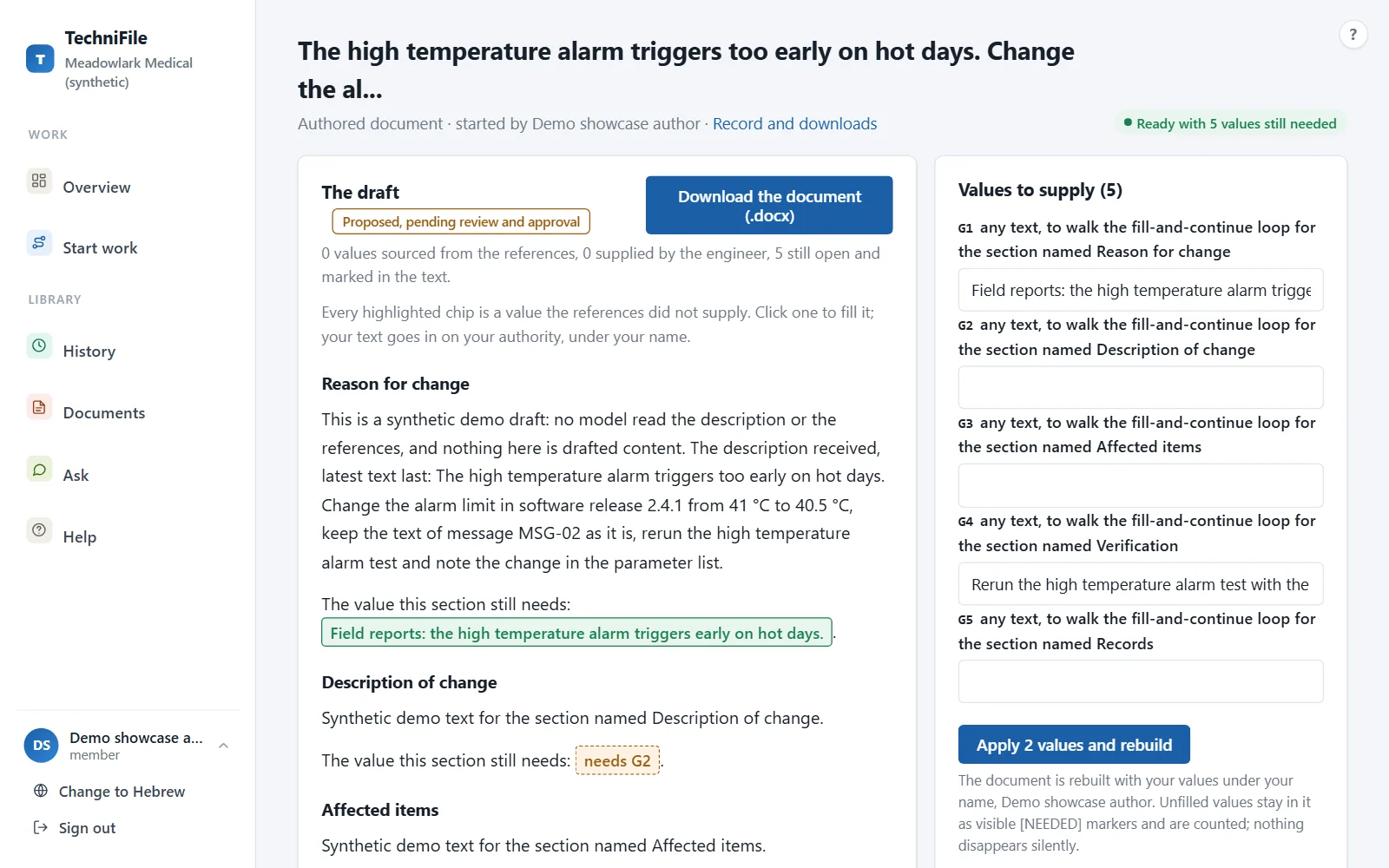
A draft with its gaps marked

The change document in your template. Each value it could not source is marked in the text and listed beside it, for the engineer to supply before the document is rebuilt.

A drafted change document with its values to supply marked in the text and listed beside it

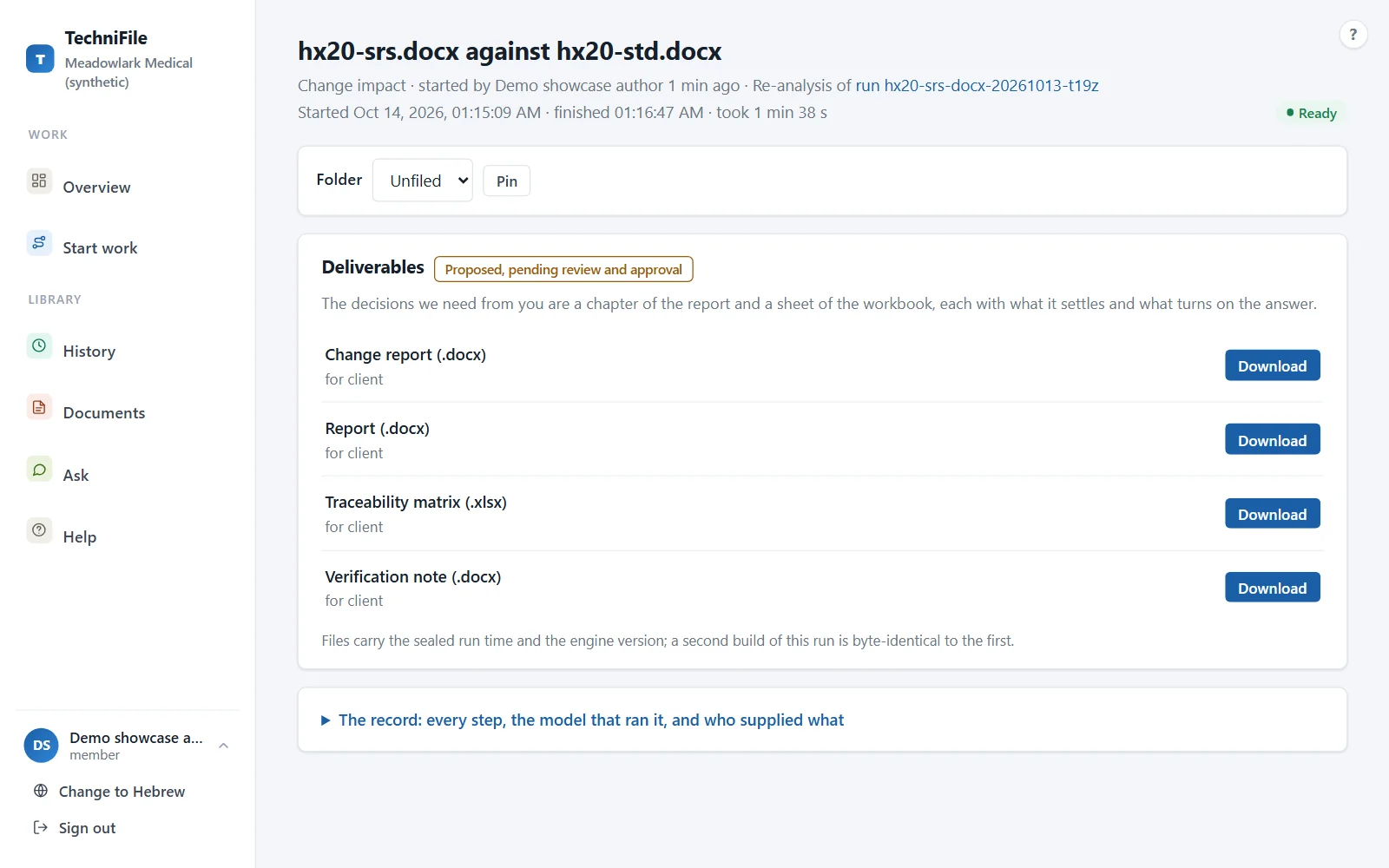
Deliverables, ready to download

A re-analysis after a new revision of the requirements: the change report beside the coverage report, the traceability matrix and the verification note. The decisions only your team can take are written into the files, not held up in the tool.

A finished re-analysis with its change report, coverage report, traceability matrix and verification note ready to download

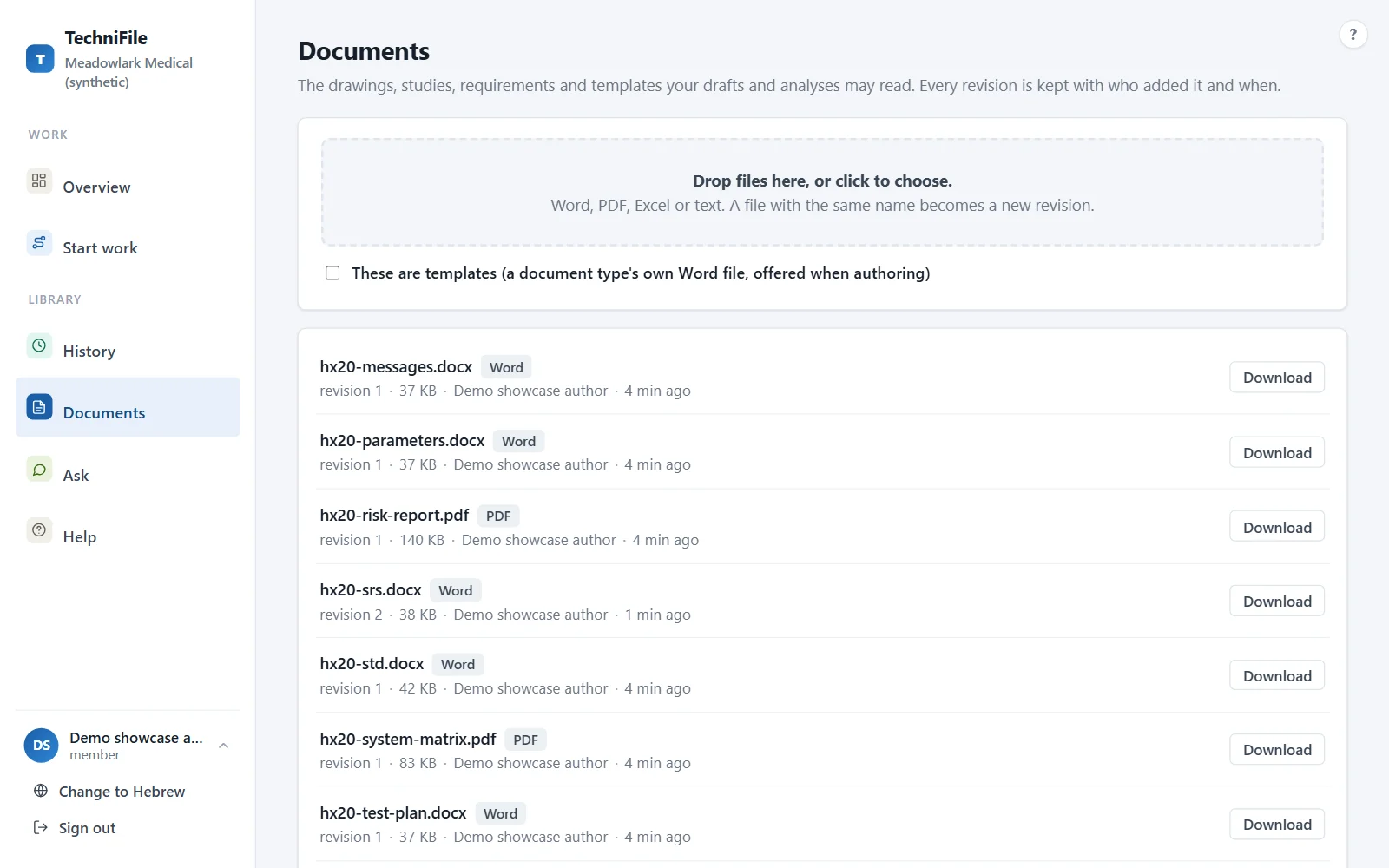
Your documents, by revision

Word, Excel and PDF files with every revision, who added it and when. A new revision never overwrites the last one.

The Documents page listing requirements, test descriptions and risk files with their revisions

Built for regulated work

What TechniFile does with your documents, and what it never does.

  • Isolated per client

    Each client is a workspace of its own. Your documents, templates and configuration never reach or shape another client's output, and the isolation is tested by trying to cross it.

  • Stored in the EU

    The engine runs in Frankfurt, and every document is mirrored to storage held in the EU by jurisdiction. Encrypted in transit and at rest.

  • A person in the loop

    Every output is proposed until a qualified person at your company approves it, and the file says so. Nothing is approved automatically.

  • Not a QMS

    TechniFile complements your QMS or PDM. Controlled records, signatures and document control stay where they are.

  • No lock-in

    Your templates, references, terminology and instructions export as a bundle whenever you ask. Export, then delete: both are yours to start.

  • No approval claims

    No AI tool is regulator-approved, and we never claim approval, acceptance or a pass rate. We document the method; your people approve the output.

Read the security summary

Who it is for

Medical-device teams who write, check and maintain regulated engineering documents.

  • R&D and design engineers

    Describe a change and get the change document drafted in your template, to complete and sign.

  • V&V engineers and managers

    Coverage, consistency and change impact across requirements and tests, and test descriptions written from the requirements.

  • Regulatory and quality teams

    Deliverables that show where every value came from and what still needs a decision, ready for your own review and your QMS.

Built from real documentation work, not a whiteboard

TechniFile grew out of documentation work on regulated medical devices: requirements, test descriptions, traceability and change records.

Its method ran end to end on real regulated device projects, against their own source documents, before it became a product. Every figure is computed, every link between documents is justified, and a deliverable whose numbers do not reconcile is not published.

TechniFile is in invite-only pilots

We take on a few teams at a time. In a pilot, we set up your templates, terminology and instructions with you, and that layer stays yours, exportable at any time. Tell us about your team and we will be in touch.

We use these details only to reply about a pilot, and delete them when you ask.